
 Danish
 English
 German



url-whitelisting
Learn more about our “link check” security feature and learn how to whitelist URLs.
Why can’t I send SMS messages with links?
It is possible to send links in SMS messages, but only after we have whitelisted the domains you want to link to.
We have set up the “link check” security feature to avoid GatewayAPI accounts being abused by sending messages that include spam, malicious links, phishing attempts, social engineering etc. This feature is enabled by default on all accounts.
The following applies for URL whitelisting
- You can whitelist an entire URL, domain, or subdomain—for example, gatewayapi.com or maps.google.com. Note: If you whitelist google.com, it does not include maps.google.com, as subdomains are not automatically included. You can also specify specific, static URLs such as gatewayapi.com/docs.
- The domains for the links must be registered.
- If it is a dynamic link, please point out the part of the link that is autogenerated.
- We do not approve shortened links, e.g. links from Bitly, TinyURL, Goo.gl, Rebrandly, Cuttly etc.
How can I get my URL whitelisted?
To make a URL whitelist request, simply:
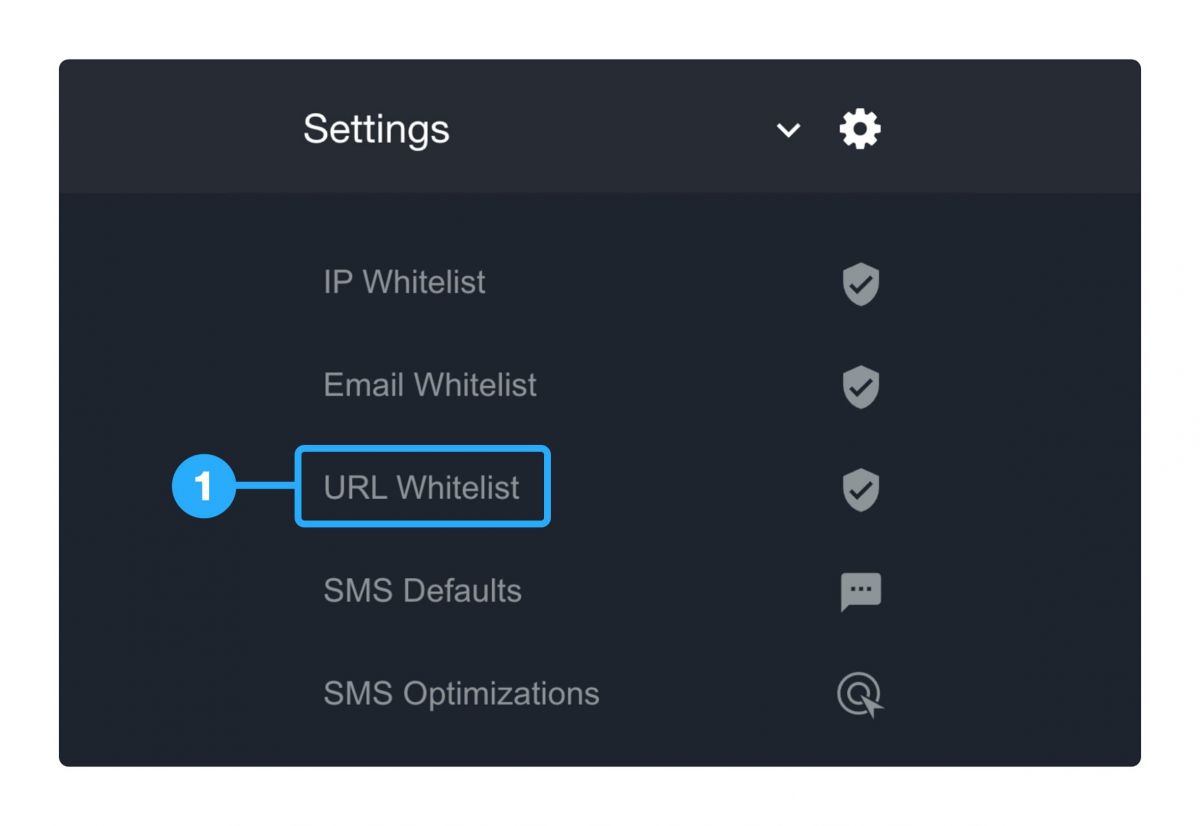
Step 1: Go to “Settings” and choose “URL whitelist”
Step 2: Add a URL and a description of how you want to use the link and for what purpose, so we can review your request (typically within one working day).
The Sender ID that will be used must be included in the request. Note: No personal names (e.g. Elisa, Alex etc.) as the Sender ID.

Can I whitelist subdomains?
Yes, we require, however, that you make a request for each subdomain. If you have a large number of links or subdomains you wish to whitelist, please contact our support team for assistance.
